



In my previous post, I showed how LinkedIn detects browser extensions as part of its client-side fingerprinting strategy. That post did surprisingly well, maybe because people enjoy reading about LinkedIn on LinkedIn.
So I decided to take another look at their fingerprinting script. At the time of writing, it lives here:
https://static.licdn.com/aero-v1/sc/h/18pfin9rcpof0ovfco31d0ik
This time, I want to focus on a different set of signals they use, ones specifically designed to detect forged or inconsistent browser fingerprints.
Detecting forged OS fingerprints with getHasLiedOs
LinkedIn’s bot detection script includes a function called getHasLiedOs. As the name suggests, it tries to figure out whether the browser is lying about its operating system.
static getHasLiedOs() {
    const e = navigator.userAgent.toLowerCase()
    let t = navigator.oscpu
    const n = navigator.platform.toLowerCase()
    let i
    if (i = e.indexOf("windows phone") >= 0 ? "Windows Phone" : e.indexOf("win") >= 0 ? "Windows" : e.indexOf("android") >= 0 ? "Android" : e.indexOf("linux") >= 0 || e.indexOf("cros") >= 0 ? "Linux" : e.indexOf("iphone") >= 0 || e.indexOf("ipad") >= 0 ? "iOS" : e.indexOf("mac") >= 0 ? "Mac" : "Other",
    ("ontouchstart"in window || navigator.maxTouchPoints > 0 || navigator.msMaxTouchPoints > 0) && "Windows Phone" !== i && "Android" !== i && "iOS" !== i && "Other" !== i)
        return !0
    if (void 0 !== t) {
        if (t = t.toLowerCase(),
      t.indexOf("win") >= 0 && "Windows" !== i && "Windows Phone" !== i)
            return !0
        if (t.indexOf("linux") >= 0 && "Linux" !== i && "Android" !== i)
            return !0
        if (t.indexOf("mac") >= 0 && "Mac" !== i && "iOS" !== i)
            return !0
        if ((-1 === t.indexOf("win") && -1 === t.indexOf("linux") && -1 === t.indexOf("mac")) != ("Other" === i))
            return !0
    }
    return n.indexOf("win") >= 0 && "Windows" !== i && "Windows Phone" !== i || (n.indexOf("linux") >= 0 || n.indexOf("android") >= 0 || n.indexOf("pike") >= 0) && "Linux" !== i && "Android" !== i || (n.indexOf("mac") >= 0 || n.indexOf("ipad") >= 0 || n.indexOf("ipod") >= 0 || n.indexOf("iphone") >= 0) && "Mac" !== i && "iOS" !== i || (n.indexOf("win") < 0 && n.indexOf("linux") < 0 && n.indexOf("mac") < 0 && n.indexOf("iphone") < 0 && n.indexOf("ipad") < 0) != ("Other" === i) || void 0 === navigator.plugins && "Windows" !== i && "Windows Phone" !== i
}
At a high level, this function tries to answer a basic question: does the operating system claimed by the browser actually make sense when you look at the rest of the environment?
The example shown in this article is intentionally simple, but the same idea can be extended much further. You can apply the exact same consistency logic to other attributes. For instance, using the WebGL renderer (as discussed in this article: The role of WebGL renderer in browser fingerprinting) to check whether the exposed GPU is consistent with the claimed user agent. A browser claiming to be a mobile Android device while exposing a desktop-class Mac GPU is a strong signal that the fingerprint has been forged.
Why lie detection works so well against bots
In bot detection, one of the most reliable ways to spot fingerprint tampering is still pretty simple: check whether the browser’s fingerprint is consistent with what it claims to be.
A very common case is bots running on Linux virtual machines. Linux is everywhere on servers and VMs, but it is much less common for real end users browsing the web. Because of that, many bots try to pass as Windows browsers, simply because Windows traffic is much easier to blend into.
The problem is that once you start lying about one thing, you often forget to lie consistently about everything else. That is exactly what checks like this are designed to catch.
Cross-checking browser signals for inconsistencies
Concretely, LinkedIn cross-checks several browser attributes against each other:
navigator.userAgentnavigator.oscpunavigator.platform- Touch-related capabilities, for example via
navigator.maxTouchPoints
The logic is straightforward. If you claim to be on Windows in your user agent, other attributes should also look like Windows.
If these values contradict each other, for example a client claiming to be on Windows while exposing a Linux navigator.platform, the function flags the browser as “lying”.
This kind of cross-attribute consistency check is a very common pattern in fingerprinting-based bot detection. We covered it in more detail in this article: How dare you trust the user agent for bot detection?
Catching smaller lies with language consistency checks
LinkedIn also runs a smaller consistency check called getHasLiedLanguages.
static getHasLiedLanguages() {
    if (void 0 !== navigator.languages)
        try {
            if (navigator.languages[0].substr(0, 2) !== navigator.language.substr(0, 2))
                return !0
        } catch (e) {
            return !0
        }
    return !1
}
This one is much simpler. It checks whether the user’s preferred language (navigator.language) matches the first entry in navigator.languages, which represents the top language preference.
When those two do not line up, it can be another signal that the browser environment has been spoofed or partially modified. On its own, this is a weak signal. Combined with others, it becomes useful.
A familiar piece of code
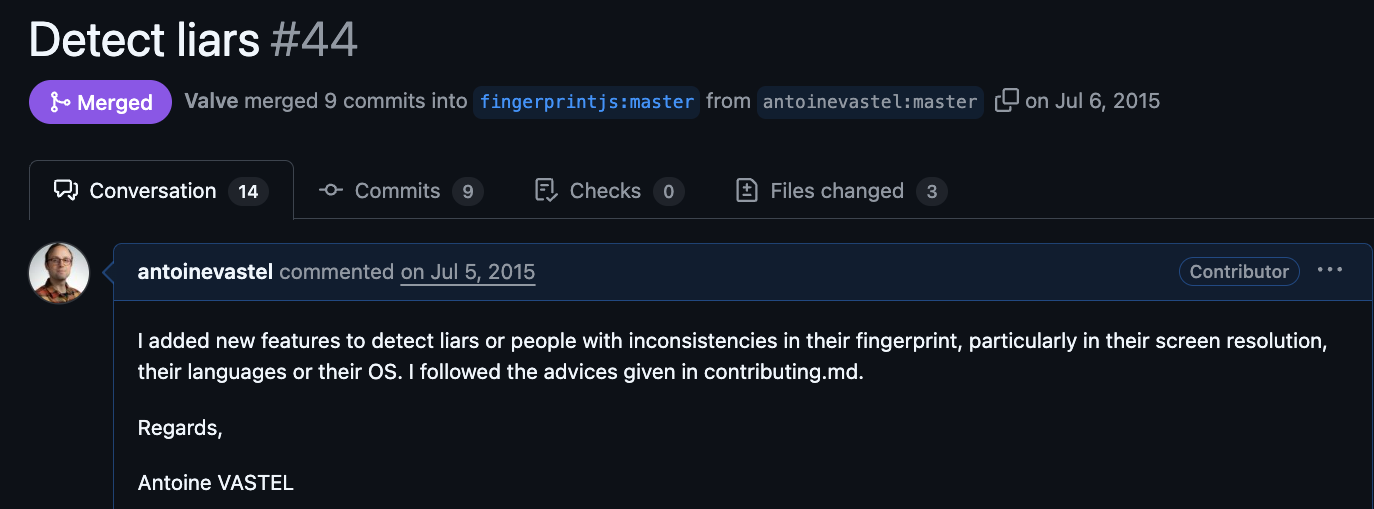
When I looked more closely at this code, I had a strong sense of déjà vu. I recognized it. It turns out this logic comes from the open-source FingerprintJS library, more specifically from the “Detect liars” PR.
I originally wrote that code back in 2015, during an internship at Inria, while working on the AmIUnique project. Always interesting to see that code I wrote during an internship more than 10 years ago is still running inside LinkedIn’s production fingerprinting stack.
What this says about fingerprinting and bot detection
Even though the ecosystem has evolved, with new browser APIs and more anti-fingerprinting techniques, the fundamentals have not really changed.
To build a solid fingerprinting or bot detection system, you still want:
- A variety of attributes that reveal information about the browser, operating system, or hardware. For example
navigator.hardwareConcurrency,deviceMemory, or techniques like canvas fingerprinting. - Signals that are reasonably stable over time. High uniqueness without stability is mostly noise.
- Cross-attribute consistency checks to catch spoofed or partially modified fingerprints.
- Enough variation to differentiate users, but not so much that small changes break everything. In some cases, grouping devices by family (for example iPhones) can even be desirable, as discussed in Google’s Picasso paper.
The tech might change, but the underlying logic of “trust, but verify” stays the same.